Disclaimer

All of the topics discussed here in this blog comes from my real life encounters. They serve as references for future research. All of the data, contents and information presented in my entries have been altered and edited to protect the confidentiality and privacy of the clients.

Various scenarios of designing RPD and data modeling

Find the easiest and most straightforward way of designing RPD and data models that are dynamic and robust

Countless examples of dashboard and report design cases

Making the dashboard truly interactive

The concept of Business Intelligence

The most important concept ever need to understand to implement any successful OBIEE projects

Making it easy for beginners and business users

The perfect place for beginners to learn and get educated with Oracle Business Intelligence

Saturday, April 28, 2012

how to reset dashboard prompt value back to default with a click

Hello again

Today, I just want to talk about a little trick that many projects have used to make their dashboard more dynamic.

This one little trick is to re-set the dashboard prompt values back to the default from the dashboard. It is pretty cool that no many what values we have been playing around with, if I want the dashboard prompt to go back to the default value, I can just make one click and it will automatically refreshed..

Let me show you what I mean:

Some by clicking on the "clear" bottom that you see on the dashboard, whatever value that's currently displayed in the 2 dashboard prompts will be reset back to default.

Given the idea, let's see how this can be done.

1. Go to the dashboard edit page and create an text section:

2. In the text 'property', enter the following XML code:


3. Now create a dashboard prompt along with this section, put add on the dashboard and test the feature..


Until next time

Wednesday, April 18, 2012

Some useful Info about OBIEE 11G file directories

Hello

Once again for those who are pretty new in OBIEE 11G, you may find that the application have quiet different file directories after installation compare to 10G. So the immediate question would be: where is the folder?

I have listed a few folder that I find useful to know in order to get around in 11g.

So here it is:


\obiee11g\Oracle_BI1\bifoundation\admin\config\OracleBIServerComponent ------- where NQSCONFIG.INI file is located

\obiee11g\Oracle_BI1\bifoundation\admin\config\OracleBIPresentationServicesComponent --- where INSTANCECONFIG.XML and credentialstore.XML files are located

\obiee11g\instances\instance1\bifoundation\OracleBIPresentationServicesComponent\coreapplication_obips1\catalog ------ Where web cat is located

\obiee11g\instances\instance1\bifoundation\OracleBIServerComponent\coreapplication_obis1\repository ---- Where the rpd file is located


The 2 below folders holds all of the image files for OBIEE to use:
\obiee11g\Oracle_BI1\bifoundation\web\app\res\s_blafp\images

\obiee11g\user_projects\domains\bifoundation_domain\servers\bi_server1\tmp\_WL_user\analytics_11.1.1\7dezjl\war\res\s_blafp\images


This is it for now. I am sure there are other folders that maybe useful for specific tasks, I will add to the list as I come across it later.

Now obiee11g is just a name of the OBIEE 11g folder that I have named, so yours could be something else, don't worry if you can't find it. It will be the OBIEE 11G folder that you name after installation..

For example, if you installed OBIEE 11G on E drive and you call the folder "MyOBIEE11G", then the path for your rpd file will then be:

E:\ MyOBIEE11G\instances\instance1\bifoundation\OracleBIServerComponent\coreapplication_obis1\repository


Until next time


Tuesday, April 3, 2012

A collection of blogs and sites for OBIEE learning

Hello Again

When I initially created this blog, my purpose was to document all of the issues and challenges that I faced at work so that I would not forget in the future. Over times, as more people come across these issues, I realized that providing solutions would not only help me as a reference for the future, it would also help others solving their problems. It made me feel satisfied as seeing that my experience was able to provide help to others who walked the same path.

I know how difficult it is for a beginner trying to learn a new technology or anything new in general. There are a lot of great resources available on the internet for us to explore and share information. I truly wished I had the same kind of resources when I started out. Therefore, my goal is to continue being a resource for those who have faced challenges in OBIEE.

Now like I said, there are a lot of resources out there, some of them repeats one common topics, others are more specialized in certain area of OBIEE. I have gone through a lot of blogs, some are very inspirational, some are pure gold mines. I will not list all of them, but I will list a few that I think are great places to start if you have more specific areas that you want to know about.

So here we go:

For 10G to 11G upgrade and various cool features in 11G:

For integrating OBIEE and google maps:
http://prasadmadhasi.com/2011/11/13/google-maps-based-background-maps-in-obiee11g11-1-1-5-0/

OBIEE 101 by John Minkjan ---- Lots of new updates, including the latest news on OBIEE.
http://obiee101.blogspot.com/

Goran Ocko's OBIEE blog ---- Lots of execellence informations on reports and rpds configuration, especially how it works with essbase.
http://108obiee.blogspot.com/


BISchool by Kishore Guggilla and Naresh Meda --- This site is particularly good for those who experiences common errors and need solutions. Here, you will find a lot of entries about the common errors you might encounter and how to handle them.
http://bischool.wordpress.com/


Frank Davis' Blog: OBIEE ONE ---- A lot of great posts covering all area of OBIEE and BI Apps. This is a bit advanced for the beginners, but it provides a lot of resources that can be very helpful on getting better with OBIEE.
http://obieeone.com/


BI Publisher Blog by Ike Wiggins --- This blog is specific to BI Publisher, great site.
http://bipublisher.blogspot.com/


Venkatakrishnan's Business Intelligence Blog ----- I have personally learned a lot from his blog. This is truly a great place to explore. You will find a lot of topics being covered. Some of the topics would make you wonder "How is it possible?", but it is!

The Rittmanmead's Blog ------- I have personally worked with Rittman's consultants in the past. They are simply some of the best. Over the years, I have checked with this blog from time to time looking for any "official" answers as they have pretty much become the voice of Oracle itself.
Hope this helps

Until next time


Wednesday, March 28, 2012

OBIEE On Mobile Devices


This is no something that just became available yesterday. The ability to gain access to OBIEE through mobile devices such as Iphone, Ipad is going to become a way going to the future. OBIEE has the feature to do just that. After all, smart phone's raising popularity is changing the way we interact with the world.

If you want to know how to set up OBIEE Mobile, oracle has an excellent document. This is not as complicated as we might think, nor is it the same as we used to understand as Disconnected Analytics.


Have fun playing!

Until next time

Saturday, March 24, 2012

OBIEE 11G: Dealing with errors when starting Services


Hello again

You can see that OBIEE 11g has made a lot of architectural changes from 10g. When it comes to managing services, it is done on weblogic instead of managing it as OS services manually. In this entry, we will just go over something simple yet common scenario of starting services, it is helpful in getting familiar with how 11g works.

So, let's start with a problem that I can't have access to the presentation service, the link isn't working.

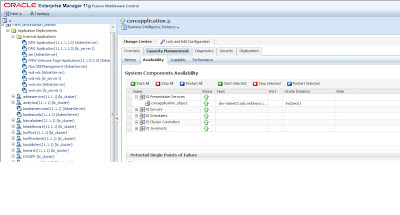
The first thing I do is by going to the Weblogic's enterprise manager to see what services are currently running. As you can see, the BI Presenation Service is down for some reasons..


Ok, that's simple. Let's click on the "start" button in the same interface, it should work. However, I run into errors and the presentation service failed to start. In the "Diagnosis" tab, it shows me a list of errors:


Most of the errors are complaining about both component coreapplication_obips1 and BI Security Service being unavailable or down:

Operation Failed: Start; OracleInstance: Instance1: Component: Coreapplication_obips1: ...............

[13037]Cannot connect to BI security service, please make sure this is running properly .................

[13037]Error in getting roles from BI security service .................

Now, how do I know where to go from here? Let's check weblogic domain:

You can see that something is not running from there, it is the BI_Server1 not running.
So, this is telling me to go look in Admin console and see how are the servers doing in BIFoundation_Domain.

Going to Admin Console:


Here the BI_Server1 needs to be started. Let's do with by going to the change center on the upper left side of the screen and "lock and edit" to enable the changing feature. Then go to 'Control' in the server pane and select BI_Server1 in order to start it:

Don't forget to go back to the change center and click "release configuration"

The BI_Server1 is running now. So now let's go back to enterprise manager to start presentation service. As it turns out, the service is started successfully this time:


Thanks

Until next time



Related Posts Plugin for WordPress, Blogger...