Disclaimer

All of the topics discussed here in this blog comes from my real life encounters. They serve as references for future research. All of the data, contents and information presented in my entries have been altered and edited to protect the confidentiality and privacy of the clients.

Various scenarios of designing RPD and data modeling

Find the easiest and most straightforward way of designing RPD and data models that are dynamic and robust

Countless examples of dashboard and report design cases

Making the dashboard truly interactive

The concept of Business Intelligence

The most important concept ever need to understand to implement any successful OBIEE projects

Making it easy for beginners and business users

The perfect place for beginners to learn and get educated with Oracle Business Intelligence

Wednesday, June 29, 2011

'Date' defined by repository with timestamp information

It's been a while since the last post.

Today, I just want to talk about something we run into on our project related to defining 'date' using repository variable.

Defining a dynamic variable that returns yesterday's date is pretty easy by just adding the following statement in the initialization block:

select sysdate-1 from dual

The result shows that it also comes with hours and seconds after the date, like so:


Now changing the statement to select trunc(sysdate - 1) from dual, will remove the unwanted values at those timestamp positions following date, like so:


All these are fine and the value that the variable provides is also correct. However, we did overlook at one thing after moving forward with this setup.

Take the variable 'Yesterday_date' for instance, when we add that variable to the filter in the report, the SQL that's generated shows the following at the where clause:

T3266990.SNAPSHOTDATE = TIMESTAMP '2011-06-28 00:00:00'

Instead of having T3266990.SNAPSHOTDATE = TO_DATE('2011-06-28' , 'YYYY-MM-DD') when filtering without variable.

As far as the data is concerned, it is working correctly, however, it may affect the query's performance when it is using TIMESTAMP.

Depending on the setup of the database and it will affect the partitioning of the query if the passing parameter has timestamp in it, which isn't going to be a optimal thing to have.

The challenge now is how to use dynamic variables and still get To_Date in the SQL.

We have reached out to oracle support, basically we have been told that this is the way it is as:
"The init block returns a timestamp because OBI has no internal knowledge of what datatypes will be returned by the SQL statement. It only knows what the database tells it"

For further reading please go to:
http://download.oracle.com/docs/cd/B14117_01/server.101/b10759/sql_elements001.htm#i54335

The bottom-line is that in order to disassociate repository variable with timestamp, the datebase itself must contain date only data-type. If you are oracle DB, it automatically includes time & second in it so it will have to be changed completely, which isn't going to be easy.

Therefore the decision is up to the business as we know the factual behavior.

Looking forward to seeing whether the next release of 11G will have to way around this behavior.

Thanks

Until next time.

Tuesday, February 15, 2011

How to join 2 tables conditionally

In a project, more often than none that it is desired to join a dimension table to a fact table based on certain conditions instead of a direct join.

For example, I have a time dimension table that keeps two calendar codes and we only want the data that its calendar code is '001' to be matching with the data in the fact table, otherwise for certain product or location, it's measure would be counting both calendar code.

Now before we proceed, let's look at another option of doing this. We can apply a filter on the time dimension table to filter out all the records that it's calendar code is '001' and then join this table to the fact. Note that if done this way, then the filter will be applied to this dimension and will not be changed. So what if this time dimension is a part of a conformed dimension that joins to two fact tables that one fact that does need both calendar code to be counted? Therefore, we will see if we can change the join logic between the time dimension and the fact table.

So let's look at the below data model:


So let's change the join between Retail Sales Calendar Time and A_RTL_Sales_Audit_AGG

Instead of using a foreign key join, let's use a complex join in physical layer (Yes, I just broke the best practice rule again!):


In the expression builder, enter the following code:
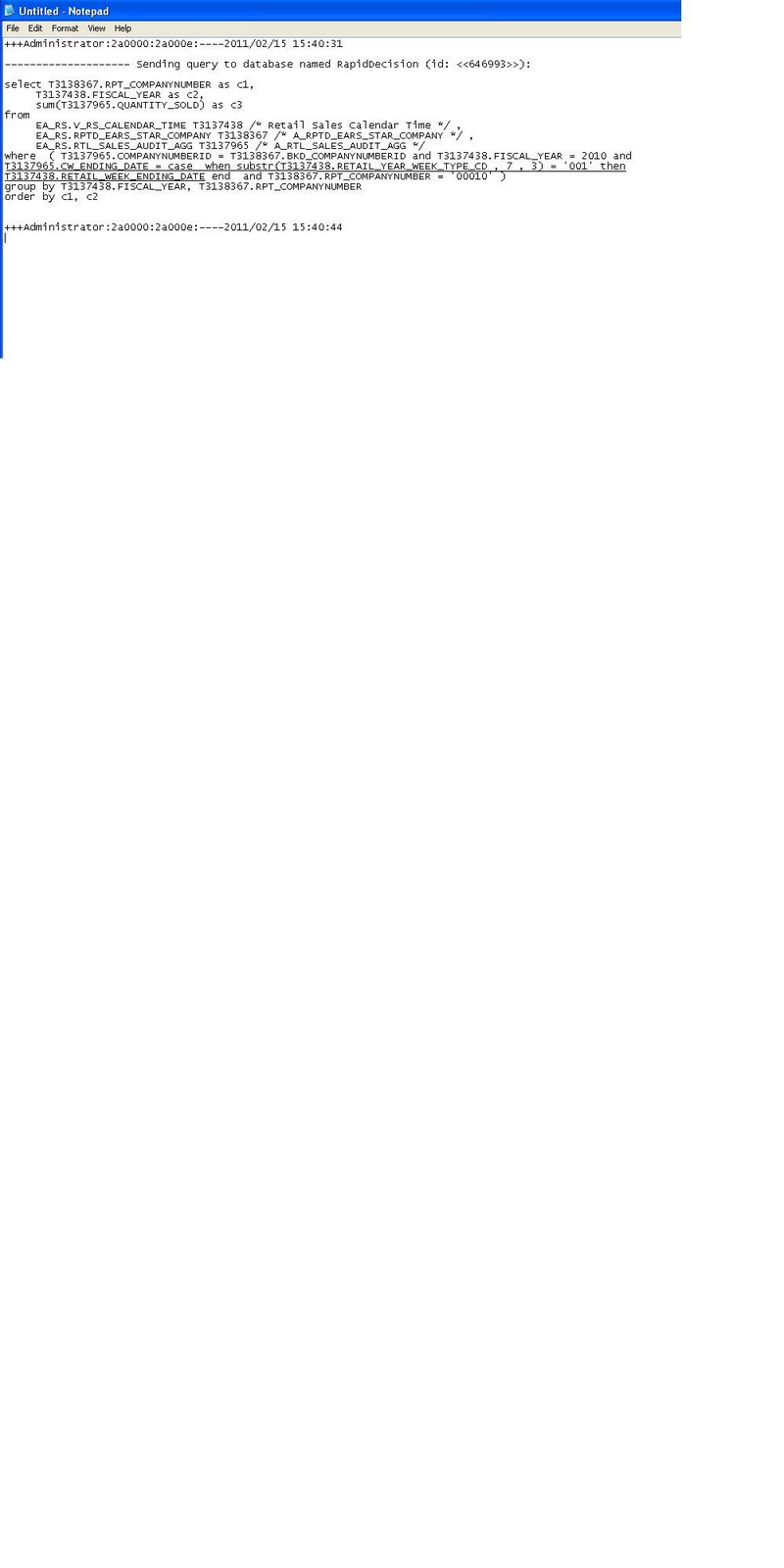
CASE WHEN SUBSTRING("Retail Sales Calendar Time".RETAIL_YEAR_WEEK_TYPE_CD FROM 7 FOR 3) = '001' THEN "Retail Sales Calendar Time".RETAIL_WEEK_ENDING_DATE END = A_RTL_SALES_AUDIT_AGG.CW_ENDING_DATE

Here what I am doing is looking up the column "Retail Sales Calendar Time".RETAIL_YEAR_WEEK_TYPE_CD and if the last 3 digits of that column is '001', then use the column "Retail Sales Calendar Time".RETAIL_WEEK_ENDING_DATE as the joining column, otherwise the join will not return any matching data.

Let's run some test:


And the resulting SQL generated by this query:


However, if the report is using measures from another fact table that doesn't want this condition to be applied:


Then the SQL generated as a result will not have the above condition applied to the query:


Thanks
Until next time!

Wednesday, June 2, 2010

Display dynamica default date value in dashboard prompt

I found this worth blogging for because it is fairly common that people want to put a default value on date dashboard prompts as current date or yesterday or any other dates that changes dynamically. So in this blog, I will just focus on setting current date as default in the date dashboard prompt.

Unlike column filters where we can enter 'current_date' in the SQL expression of the 'Add' tab of the filter property, we can't really do the same in dashboard prompt property. Therefore, the first way of doing it will be creating dynamic variable in Admin tool with a query statement like 'select sysdate from dual' in the initialization block, and call this dynamic variable in the dashboard prompt property (Go to prompt property ---Default to--- Server variable--- enter dynamic variable name).

I highly recommend creating this current date variable in every OBIEE project because it can be beneficial to a lot of people in a lot of areas with similar needs. However, creating this dynamic variable will requirement some level of configurations in the rpd, which will need time to have it ready to use in the presentation service. Let's say some users want to set current date as default in one of the dashboard prompt and it must be done asap, we can't just go configure the dynamic variable if we are talking about making changes in live production.

Therefore, we have another option.

In prompt property, go to 'default to' drop down and select 'SQL results'


In the SQL result, enter this select statement (for my case): Select "Received Interface Records"."Date Updated" from "Insight Monitoring"."Received Interface Records" where "Received Interface Records"."Date Updated" = CURRENT_DATE

The table name and column name of this statement should be the same as displayed in column formula content, this is not where you expect to enter the physical SQL for database, so don't get confused with the statement you would enter dynamic initialization string.

After that, let's preview this prompt:


This method will give you instant result, however, some level of technical skill is needed. So use it depending on the expectation of your project and what level of training the business users have.

til next time

Saturday, May 29, 2010

Understanding Complex Join and Physical Join in OBIEE

What is the difference between complex join and physical join? The easiest way to understand the basic is to remember that physical join is used in Physical layer and complex join is used in BMM layer. However, just knowing that isn't going to be enough to build solid skills on OBIEE development. In order to gain more insight on how it really works in OBIEE, we need to know more about these 2 types of joins.

First, let's look at complex join:


The diagram is a window of a typical complex join. In here, you notice that you can't change any of the table columns of neither logical tables in the join and the expression pane is grayed out. However, you are able to change the type of join from inner to outer joins. This type of behavior is telling us that complex join is a logical join that OBIEE server looks at to determine the relationship between logical tables, in other words, it is just a placeholder. Complex join will not be able to tell the server what physical columns are used in joining, but it will be able to tell the server what type of join this is going to be..

In order to know how exactly the join is, we will need to look at physical join in the physical layer:


Notice that in this window of physical join, we are able to change the columns under both tables, we are also able to define our own expressions. However, are can't change the joining method unlike complex join. This behavior is to help us to know that this is where we tell OBIEE how to join the 2 actual tables by specifying the columns. Hence this is what physical join does.

Knowing the basic, let's take a step further. Can I use complex join in physical layer or can I use physical join in BMM layer? Yes we can, and by doing it the application will not flag errors. However, we need to know when to use them and what to expect after using them..

Let's look at complex join in physical layer. Although it doesn't happen frequently, it is sometimes needed. Let's say we have 2 tables, promotion fact and contract date dimension. I want to join these 2 tables in such way so that only the dates that are still in contract should return. Therefore, I can't just use a simple join on the date columns from both tables, conditions need to be applied.. In this case, let's use complex join in physical layer:


In the below diagram, I enter 'PTS_DATES.COMPANYDATEID >= PTS_STAR_FACTS.CONTRACTSTARTDATEID AND PTS_DATES.COMPANYDATEID <= PTS_STAR_FACTS.CONTRACTENDDATEID' to satisfy the joining condition. At the front end, when you run a report using these tables, this expression will be included in the where clause of the SQL Statement:


Having physical join in BMM layer is also acceptable, however it is very rare to see that happen. The purpose of having physical join in BMM layer is to override the physical join in physical layer. It allows users to define more complex joining logic there than they could using physical join in physical layer, in other words, it works similar to complex join in physical layer. Therefore, if we are already using complex join in physical layer for applying more join conditions, there is no need to follow this set up with physical join in BMM layer again.

Remember, the best data modeling design in OBIEE is not the most complex and overly convoluted design, it should be as straightforward as possible. Therefore, use physical join in physical layer and complex join in BMM layer as much as you can. Only when situation calls for a different join, then go for it.

Til next time

Monday, May 24, 2010

How to use Dynamic Variable in OBIEE

What is dynamic variable? According to OBIEE Admin guide, it is basically a variable that dynamically holds its value depending on the way it is defined. In this blog, I am going to talk about how to create dynamic variables and also how to apply them. The goal is for the beginners to get a good understanding of dynamic variable so that they will be able to apply them when situation calls for it.

Let's start with creating a very simple dynamic variable. I want this variable to always hold yesterday's date so that in OBIEE answers, I can always use this dynamic variable to any numbers of report.

Also, let's start with creating a new initialization block, it is basically the place to define the content of this variable and how it queries the desired value:


I am calling this initialization block "Yesterday" and in the 'Edit Data Source', I have ented select to_char(sysdate-1, 'dd-Mon-yyyy') from dual for the initialization string. The format of the SQL statement should be exactly the same as you would enter directly in the database. So a good practice in general is to try the query in your database to make sure it works before entering it in the initialization block. Keep in mind that depending on what type of database you are using, the SQL statement may not be supported. Therefore, lets test the initialization string and see how it works:


And it works. The connection pool should be the one used for the same physical tables in OBIEE.

Now let's associate this Initialization block to a new dynamic variable by clicking 'Edit Data Target':


I will just call this variable 'Yesterday'. So now this variable will always return yesterday's date.

Let's create another dynamic variable with slightly more complex logic. This time I want this variable to give me the current GL months, which is 7 months lagging current calendar month. Moreover, the first day of the GL month starts on every 15th day of each calendar month. Therefore, Let's write the following select statement:

SELECT DISTINCT a.posted_period gl_dashboard_period
FROM rd_glmart.v_gl_star_factsdetails a
WHERE a.posted_period =
TO_CHAR
(ADD_MONTHS (CASE
WHEN TO_CHAR (SYSDATE, 'dd') < '15' THEN (SYSDATE - 15) ELSE SYSDATE END, -7 ), 'yyyymm' )


Test and see the result:


Since today is May 14th and the result of this initialization string brings back 200909, I'd say it is pretty good.

Now I have two dynamic variables: Yesterday and GL Current Closed Period. Let's apply them in our reports.

Enter the name of the dynamic variable: GL Current Closed Period in the filter


And the result:


Til next time.
Related Posts Plugin for WordPress, Blogger...